Resep Burger Ubi Ungu Dan Singkong Nikmat, Sehat dan Enak

Bahan-Bahan Burger Ubi Ungu Dan Singkong:

LARUTAN RAGI

1. 200 ml air hangat
2. 1 1/2 sdt ragi instan
3. 1 1/2 sdt gula


ADONAN

1. Ubi di parut, 125gr
2. Tepung terigu 4 gelas
3. 1 1/2 sdm gula
4. 1/2 sdt garam
5. 1 telur, dikocok
6. 45gr mentega
7. Putih telur secukupnya
8. Wijen secukupnya

DAGING

1. Daging cincang 500gr
2. Garam 1 sdt
3. Merica 1 sdt
4. Bubuk Bawang Putih 1 sdt (Bisa diganti bawang putih di blender)
5. Kecap Worcestershire 1 sdm
6. Mustard 1/2 sdm
7. Mint secukupnya
8. Keju lembaran

MAYONAISE DAN TOPPING LAINNYA

1. Mayonaise 4 sdm
2. Air Lemon 20ml
3. Tomat
4. Selada

Opsional
1. Parchment Paper

Read More

Tips Memilih Tepung Terigu Terbaik, Berkualitas dan Bermutu

Tips Memilih Tepung Terigu Terbaik, Berkualitas dan Bermutu
CARA MEMILIH TEPUNG TERIGU BERKUALITAS DAN BERMUTU


Jika anda pergi ke supermarket untuk membeli tepung, anda akan menemukan beberapa jenis atau label tepung dari merek yang sama. Ini artinya memang benar ada perbedaan antara tepung-tepung yang beredar di pasaran, jadi jangan salah pilih!

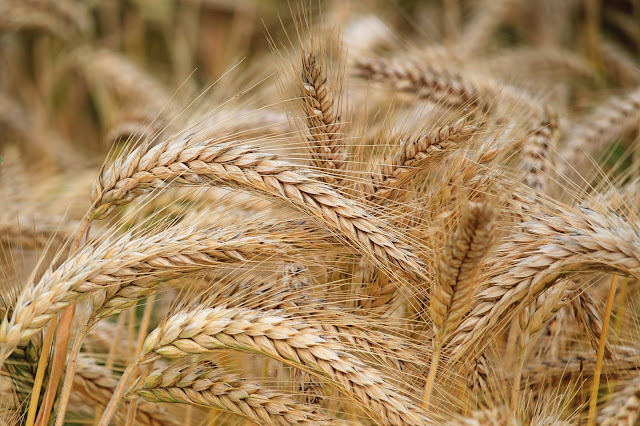
Struktur Gandum


Tips Memilih Tepung Terigu Terbaik, Berkualitas dan Bermutu
Stuktur Gandum


Ada tiga bagian dari sebuah biji gandum: Bran, yaitu kulit luar biji, Endosperm, yaitu bagian yang memiliki banyak karbohidrat dan Germ, yaitu biji kecil yang mengandung banyak vitamin dan lemak tak jenuh.

Berdasarkan bagian apa saja yang digunakan dalam tepung, ada dua jenis tepung. Ada tepung whole wheat flour dan white flour. Whole wheat flour adalah jenis tepung yang berkomposisi ketiganya: bran, germ dan endosperm. Sedangkan white flour hanya berkomposisi endosperm. Whole wheat flour lebih sehat karena lebih banyak mengandung nutrisi, tetapi membuat roti dengan white flour lebih mudah. Whole wheat flour juga sering disebut Wholemeal flour. Ada varian dari whole wheat flour yang disebut whole grain flour, yang dapat berarti tepung tersebut berkomposisi endosperm gandum dan bran dan germ yang berasal dari biji yang masih dalam bangsa-bangsa serealia (contoh: beras, barley, dll.)

Sayangnya, di Indonesia whole wheat flour masih jarang terlihat dipasaran. Salah satu produsen tepung terigu ternama asal Indonesia, Bogasari, memiliki produk whole wheat flour. Tepung ini diberi label Taj Mahal. Namun, sangat jarang ditemukan di supermarket-supermarket pada umumnya.


Kandungan Protein

Selain dari komposisi tepung, kandungan protein dalam tepung juga tidak kalah penting. Produsen tepung biasanya memilah-milah gandum berdasarkan konten protein didalamnya. Protein dalam tepung memberikan tekstur "elastis" pada adonan dan tergantung pada penggunaanya, dapat berarti bagus maupun tidak.


Tips Memilih Tepung Terigu Terbaik, Berkualitas dan Bermutu
Kue Dari Tepung Terigu

Jenis-Jenis White Flour

1. Tepung Serbaguna (All Purpose Flour)

Tepung serbaguna, seperti namanya dapat digunakan untuk membuat (hampir) semua jenis produk olahan dari tepung. Tepung jenis ini memiliki konten protein diantara tepung berprotein tinggi dan tepung berprotein rendah. Maka dari itu, tepung jenis ini dapat digunakan untuk menggantikan kedua tepung tersebut, meskipun hasilnya seringkali tidak sebaik menggunakan tepung-tepung tersebut. Namun karena tepung ini serbaguna, jika anda bingung harus menggunakan tepung apa, gunakanlah tepung jenis ini.

Contoh dari tepung jenis ini adalah Sania, Bogasari Segitiga Biru, Sriboga Beruang Biru, dll.
Baik untuk: Semua jenis makanan


2. Tepung Roti (High-Protein)

Tepung roti memiliki konten protein yang lebih tinggi. Oleh karena itu, hasil olahan menggunakan tepung roti, jika diuleni dengan benar akan memberikan tekstur "elastis" atau "chewy". Tepung jenis ini ideal untuk makanan-makanan yang memiliki tekstur elastis seperti roti dan mie.

Contoh dari tepung jenis ini adalah Sania, Bogasari Cakra Kembar, Sriboga Tali Biru, dll.
Baik untuk: Roti Tawar, Roti Manis, Donat, Burger Buns, Mie, dll.


3. Tepung Kue (Low-Protein)

Tepung jenis ini memiliki konten protein yang lebih rendah. Protein yang rendah ini akan menyebabkan hasil olahan yang dibuat menggunakan tepung ini empuk dan soft. Karena itu, tepung jenis ini cocok untuk digunakan pada dimana ke-empukan lebih penting dari elastisitas olahan, seperti halnya dalam cake dan biskuit. 

Contoh dari tepung jenis ini adalah Sania, Bogasari Kunci Biru, Sriboga Pita Merah, dll.
Baik Untuk: Cake, Tepung gorengan, Biskuit, Kue, Pasta, dll.

Read More

Resep Fish and Chips yang Crunchy Gurih Ala Resto

Fish and Chips adalah hidangan goreng ala western sederhana yang dapat dinikmati oleh semua kalangan. Hidangan ini memang tidak memiliki banyak bahan dan bumbu-bumbu tambahan, tetapi justru kuncinya ada pada bahan-bahan yang sederhana tersebut. Kombinasi antara ikan yang diberi tepung bumbu, kentang yang digoreng agar terasa crispy, kacang polong dan saus tartar yang sangat berpadu dengan baik juga merupakan keunikan hidangan ini.

Walau terkesan restriktif, Fish and Chips justru malah sebaliknya. Penggunaan jenis ikan dan penambahan bumbu-bumbu lain sesuai selera seperti paprika bubuk, jahe, dll. sering ditemukan pada hidangan ini. Namun pada resep ini bahan-bahan yang digunakan adalah sesederhana mungkin.


FISH AND CHIPS
FISH AND CHIPS

Bahan-Bahan

untuk satu porsi
  1. Fillet ikan (lebih baik segar) ~200gr, dilap dengan kain agar tidak basah
  2. Tepung Terigu ~50gr
  3. Garam secukupnya
  4. Merica secukupnya
  5. Air Soda ~50ml
  6. Kentang, dikupas dan dipotong dengan lebar 1x1cm
  7. Kacang Polong
  8. Mentega Secukupnya
  9. Daun Mint 6-8 helai
  10. Mayonaise 2 sdm
  11. Jeruk nipis/lemon 1 buah
  12. Daun Adas secukupnya


Cara Membuat Fish and Chips Enak dan Renyah

Untuk Kentang

  1. Rebus kentang yang sudah dipotong-potong selama kurang lebih 3-4 menit
  2. Goreng pada api kecil sampai kentang berwarna kuning
  3. Angkat, lalu besarkan api. Goreng pada api besar sampai kentang berwarna keemasan (seperti gambar)


Untuk Saus dan Kacang Polong

  1. Rebus Kacang Polong
  2. Sangrai dengan sedikit mentega dan tambahkan daun mint yang telah dipotong-potong
  3. Tambahkan garam dan aduk hingga merata
  4. Campurkan mayonaise dengan perasan jeruk nipis dan daun adas yang sudah dipotong-potong, aduk hingga tercampur dengan baik


Untuk Ikan dan Tepung

  1. Campurkan tepung, garam, merica dan air soda dan aduk hingga memiliki kekentalan seperti kecap manis
  2. Berikan ikan sedikit tepung, lalu celupkan pada tepung
  3. Goreng pada api sedang, dengan membalik-balikkan pada proses penggorengan
  4. Tunggu sampai ikan berwarna keemasan dan angkat
Read More

Resep Cara Membuat Nugget Pisang Kekinian Super Kriuk

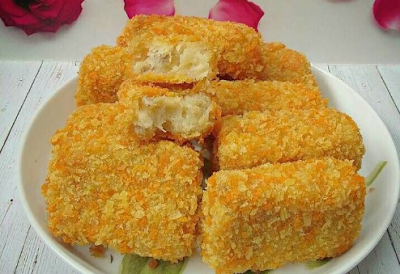
Resep Cara Membuat Nugget Pisang - Kudapan kekinian yang memiliki rasa manis gurih ini bakal jadi favorit kelurga. Cocok juga untuk bekal anak sekolah, sajian arisan, pengajian dan juga isian snack box. Namanya nugget pisang yang familiar disebut banana nugget atau pisang nugget.

Bagi Anda penggemar olahan pisang, tentunya sudah tak asing lagi dengan pisang nugget bukan? Makanan yang terbuat dari bahan utama pisang ini memang lagi ngehitz banget di tahun 2017 ini. Walaupun sebenarnya makanan ini sudah ada dari beberapa tahun yang lalu.

Untuk membuat resep pisang nugget kekinian tentu saja yang di butuhkan adalah pisang. Pilih pisang yang benar-benar matang sempurna, agar rasa pisang nugget yang dibuat terasa gurih, manis nan legit.

Soalnya pernah pengalaman bikin resep pisang nugget kekinian pakai pisang yang belum terlalu matang rasanya kaya ada sepet-sepet khas pisang gitu. Itu critanya saya gak sabar mencoba resep nugget pisang kriuk. Jadi pas dapat pisang belum terlalu matang langsung saja buat saja hihihi. Tapi tetap enak kok, walaupun gak seenak nugget pisang yang memakai pisang yang benar-benar matang sempurna.

Ada banyak cara menikmati pisang nugget crispy ini, yaitu dengan cara di makan begitu saja. Dan juga bisa di beri topping aneka rasa sesuai selera. Seperti keju, coklat batangan, nuttela, susu kental manis, meises coklat dan warna-warni, kacang almond dan bahkan krim keju.

Untuk topping suka-suka yes, di sesuaikan dengan selera masing-masing saja. Langsung saja yuk di simak Bahan-bahan dan Cara Membuat Resep Nugget Pisang Kekinian seperti berikut ini.


Step By Step Membuat Resep Nugget Pisang Kekinian Kriuk

PISANG NUGGET ORIGINAL


Bahan-bahan Pisang Nugget :

  • Pisang kepok 1kg (bisa gunakan pisang apa saja)
  • Tepung terigu 6 sendok makan
  • Susu bubuk putih 4 sendok makan (saya pakai Dancow, hasilnya enak dan wangi)
  • Gula pasir 4 sendok makan
  • Telur 2 butir, kocok lepas
  • Garam 1/2 sendok teh
  • Keju parut 100 gram 

Bahan Pelapis atau Pencelup : 

  • Tepung terigu 250 gram atau secukupnya
  • Tepung panir 500 gram atau secukupnya

Topping :

  • Nutella, meises, keju parut, sringkle, kacang almond, DCC (Dark cooking chocolate) lelehan coklat atau coklat warna warni, selai nanas, greentea, susu kental manis, oreo, tiramissu dan lainnya sesuai selera. 

Langkah Cara Membuat Nugget Pisang :

  1. Hancurkan pisang dengan garpu atau gelas sampai benar-benar hancur hampir lembut.
  2. Tambahkan tepung terigu, susu bubuk Dancow, gula pasir, garam dan telur, aduk rata. Kemudian tambahkan keju, aduk rata.
  3. Selanjutnya masukkan ke dalam loyang yang sebelumnya sudah di oles minyak dan di alasi plastik, kukus kurang lebih selama 25 menit atau sampai matang.
  4. Angkat, lalu tunggu sampai dingin. Bisa masukkan ke dalam kulkas terlebih dahulu kemudian di potong-potong sesuai selera.
  5. Selanjutnya celupkan potongan nugget ke dalam adonan tepung terigu dan air, lalu gulingkan ke dalam tepung panir. Ulangi sampai semua adonan habis.
  6. Goreng dalam minyak panas dengan mengunakan api sedang sampai kuning keemasan, angkat lalu tiriskan.
  7. Beri topping sesuai selera, nugget pisang yang disebut banana nugget pun siap di nikmati selagi hangat. Krenyes! Kriuk diluar, tetap lembut di dalam.

Nugget pisang kepok goreng hitz ini paling enak di nikmati selagi dalam kondisi hangat. Rasanya enak dan cocok untuk teman bersantai sembari minum teh.

Adanya resep pisang nugget kekinian ini menambah daftar camilan enak yang dibuat dari pisang ya. Pokoknya saya selalu suka olahan pisang entah itu mau dibuat bolu pisang, cake pisang apel, keripik pisang, pisang goreng, pisang kukus, kolak pisang, es kul kul (es pisang coklat), es susu banana, es pisang hijau, molen pisang dan bolen pisang.

Bagi Anda yang sebelumnya sudah punya usaha kue rumahan, rasanya tak ada salahnya menambah pisang nugget ke daftar jualan. Pisang nugget untuk jualan bisanya di jual dengan harga Rp 10.000.- per 5 bijinya. Topping bisa di mix sesuai permintaan pembeli.

Oh iya, dalam resep pisang nugget kekinian ini saya buat dari 1 kg pisang. Selamat mencoba dan berkreasi dengan Resep Pisang Nugget Kekinian Enak Kriuk (Banana Nugget).

Read More

Resep Hotdog Sosis Mini Enak dan Sederhana Untuk Jualan

Resep Hotdog Sosis Mini Enak dan Sederhana Untuk Jualan
HOTDOG SOSIS MINI


Resep Hotdog Sosis Mini

Untuk 12 Buah hot dog

Larutan ragi

1. 100 ml air hangat
2. 100 ml susu hangat
3. 1 1/2 sdt ragi instan
4. 1 1/2 sdt gula


Adonan

1. Tepung Roti 3 1/2 Gelas
2. Gula Pasir 2 sdm
3. Telur 1 Buah (Besar)
4. Mentega cair 40 gram
5. Garam 1/2 sdt
6. Telur dikocok secukupnya
7. Wijen (Opsional)

Topping Mayonaise dan topping lainnya

1. Mayonaise 6 sdm
2. Air Lemon 30ml
3. Tomat
4. Selada
5. Sosis (Satu buah untuk setiap hot dog)

Opsional

1. Parchment Paper


Cara Membuat

1. Masukkan ragi instan dan gula pasir pada air hangat, aduk hingga tidak ada gumpalan lalu tutup dan tunggu selama 10 menit.
2. Di wadah yang lain, aduk rata tepung terigu, gula pasir dan garam.
3. Tuang semua bahan cair kedalam tepung, lalu aduk hingga semua tercampur dengan baik
4. Uleni adonan dengan tangan atau stand mixer selama 15-25 menit sampai adonan elastis
5. Tutup dengan cling wrap atau lap basah, lalu tunggu mengembang selama satu sampai satu setengah jam
6. Keluarkan adonan, kempeskan lalu bagi 12 buah
7. Dengan menggunakan penggiling (penggilas) adonan, ratakan adonan dan bentuk sebuah persegi panjang berukuran ~5cm x ~15 cm
8. Gulung adonan, lalu "tutup" kedua ujung adonan. Pindah ke nampan yang sudah dilapisi Parchment Paper
9. Tutup nampan dengan cling wrap atau lap basah. Tunggu selama 45 menit sampai mengembang
10. Lapisi atas adonan dengan telur secara gentle, lalu taburkan wijen diatasnya (opsional)
11. Panggang di api menengah-rendah selama kurang lebih 20 menit sampai warna berubah menjadi coklat ke-emasan
12. Keluarkan dari oven dan tunggu 10-15 menit agar mendingin


Untuk Topping

1. Campurkan Mayonaise dan Air Lemon sampai benar benar tercampur
2. Potong bagian atas roti, dan bagi dua, tetapi jangan sampai putus
3. Panggang sisi luar roti sebentar pada panci teflon, lalu olesi dengan mayonaise
4. Tambahkan selada, tomat, lalu sosis diatasnya (Seperti pada digambar)

Read More

HP DeskJet 2600 Drivers Download

HP DeskJet 2600 Printer driver software can receive commands from a printer, each want to print HP DeskJet 2600 Printer need software in order to be on the disabled by the operating system.

Under available DeskJet 2600 download software drivers for Windows operating systems also Mac, sourced from https://support.hp.com/. Download the DeskJet 2600 file, for example DeskJet 2600 heartily recommend Easy Start for Mac, or HP DeskJet 2600 series Full Featured Software and Drivers for windows and mac. but you can also choose the
file for your needs.
HP DeskJet 2600 Drivers Download

HP DeskJet 2600 Drivers software Download


DOWNLOAD 7.3MB ↔ HP Easy Start (Type: Driver) Ver.2.6.1.164, for Mac OS X 10.9/Mac OS X 10.10/Mac OS X 10.11/Mac OS X 10.12. [added: Jun 14, 2017] - recommended
Description: HP Easy Start version 2.6.1.164 is the new way to set up your HP DeskJet 2600 All-in-One Printer and prepare your Mac 10.9 - macOS 10.12 for printing. HP Easy Start 2.6.1.164 will locate & install the latest DeskJet 2600 software and then guide you through DeskJet 2600 printer setup.

DOWNLOAD 127.7MB ↔ HP DeskJet / Ink Advantage 2600/2675/2676/2677/2678 Full Feature Software and Drivers 43.2 for Windows 7 32/64bit, Windows 8 32/64bit, Windows 8.1 32/64bit, Windows 10 32/64bit. [added: Jul 19, 2017] - recommended

Description: Full Feature Software and Drivers 43.2 includes everything you need to install and use your DeskJet / Ink Advantage 2600 printer. Full Feature Software and Drivers 43.2 collection of software includes the complete set of HP DeskJet 2600 drivers, installer also optional software.

DOWNLOAD 58.9MB ↔ HP DeskJet / Ink Advantage 2600/2675/2676/2677/2678 All-in-One Printer series Basic Driver 43.2 for  Windows XP 32-bit / Windows XP 32-bit, Windows 7 32-bit, Windows 8 32-bit, Windows 8.1 32-bit, Windows 10 32-bit. [added: Jul 19, 2017]

DOWNLOAD 5.7MB ↔ HP Easy Start for Windows Printer Utility Software 6.0.3355.37 support Win7 32/64bit, Win8 32/64bit, Win8.1 32/64bit, Win10 32/64bit. [added: Aug 2, 2017]

DOWNLOAD 64.8MB ↔ HP DeskJet / Ink Advantage 2600/2675/2676/2677/2678 All-in-One Printer series Basic Driver 43.2 for  Windows XP 64-bit / Windows XP 64-bit, Windows 7 64-bit, Windows 8 64-bit, Windows 8.1 64-bit, Windows 10 64-bit. [added: Jul 19, 2017]

If the above link is broken please contact us in order to promptly update.


HP DeskJet 2600 Review
While we're accustomed to listening to a lot about new tech tailored for millenials, HP Inc. has taken a fascinating new tack with its DeskJet 2600, which may be simply the thing for non-tech oriented elders who want a straightforward to run residence printer/All-in-One. The brand-new DeskJet 2600 functions wireless connection, "however junks a great deal of other bells as well as whistles-- to fulfill their (individuals') requires for cordless printing from a smart device or
tablet computer, at a cost effective price."

From an advertising and marketing objective, this might be just the ticket, as HP points out that the American population aged 65 and older is anticipated to double. As the firm mentions: "Baby Boomers will certainly be heading right into their golden years with their smart devices in hand. However the methods which this team utilizes their technology will transform considerably as they age." The brand-new DeskJet 2600 series, retails for $49.99, as well as offers wireless and mobile connectivity, and also color print, duplicate, and check. It's available now in the United States, and also will be available worldwide later this year,

Cari Dorsh, director of home consumer product monitoring at HP Inc. commented: "The client we are targeting does not require 100-sheet inputs trays or really fast speeds, due to the fact that they don't do a lots of printing. They need comfort, ease-of-use and dependability in an inexpensive gadget."

HP DeskJet 2600 Wi-Fi Direct
HP mentions that, with fewer cable televisions, wireless printing uses much versatility in where a printer is positioned and allows printing from mobile devices and Computers alike. However, for customers who don't have broadband in the house, HP claims it embedded Wi-Fi Direct in the DeskJet 2600, making certain that individuals-- or any person who walks into your house-- can still print from their smartphones or various other mobile computing devices

" We know that the whole market is moving toward cordless and clients want mobile," Dorsh said. "Wi-Fi Direct enables numerous individuals to connect their smartphone or tablet directly to the All-in-One as well as easily print without accessing a network."

Reassessing style
HP states its designers had the ability to keep prices down by getting rid of higher-end functions, streamlining the gadget, and also making it easy to use ideal out-of-the-box.

There aren't a lot of features to obtain perplexed about, Dorsh said, making it a perfect printer for vacant nesters or in multi-generational homes where grandparents reside with their school-age grandkids. According to Dorsh, having wireless connectivity and mobile printing is more crucial compared to higher-end functions for this segment.

Those design tweaks consisted of enlarging the control buttons and reducing the feature set on the control board making the printer's abilities understandable. For people on a minimal budget, HP is likewise offering low-cost, subscription-based Split second Ink services that guarantees ink is delivered instantly when materials are running low, for a regular monthly fee that is as little as $2.99 monthly.

HP rates the DeskJet 2600 at approximately 7.5 (black)/ 5.5 (shade) ppm, and also along with Wi-Fi Direct, it likewise sustains Apple AirPrint for mobile printing. It features a 60-sheet paper input tray, 25-sheet result tray, and also platen-only scanning. Replacement ink cartridges contain: HP 65 Black Ink Cartridge (returns around 120 web pages); HP 65 Tri-color Ink Cartridge (returns roughly 100 web pages); HP 65XL Black Ink Cartridge (yields around 300 web pages); and HP 65XL Tri-color Ink Cartridge (yields approximately 300 web pages).

Wireless arrangement was structured, also. All of it can be done using the HP All-in-One Remote mobile phone app that walks through the procedure for an easier customer experience.

" We made the arrangement a lot easier for individuals that typically aren't always tech-savvy," Dorsh stated. "They obtain these forward-looking features and something everyone in your home could link to without a lot of added price or complexity."
Read More

Brother TD-4100N Driver Download For Mac, Linux, Windows

Download the correct driver that compatible with your operating system.

Windows XP 32-bit, Windows XP 64-bit, Windows Vista 32-bit, Windows Vista 64-bit, Windows 7 32-bit, Windows 7 64-bit, Windows 8 32-bit, Windows 8 64-bit, Windows 8.1 32-bit, Windows 8.1 64-bit, Windows 10 32-bit, Windows 10 64-bit

Macintosh OS X (v10.5), Mac OS X (v10.6.x), Mac OS X (v10.7.x), Mac OS X (v10.8.x), Mac OS X (v10.9.x), Mac OS X (v10.10.x), Mac OS X (v10.11.x), Mac OS X (v10.12.x)

Brother TD-4100N Driver Download
Brother TD-4100N Driver Download – At a price of only one printer, the TD-4000 is a whole institutionalised label programming and framework stamp printing result. Windows ® GDI development harass, how we see and use, so why keep programming today, such as your name, receipts and labels to print printer borders with inheritance? A right-GDI workspace framework-printer, the TD- 4100n is completely spotless with Windows ® operating system machines-consolidation of Windows ® 7 ¹.

Brother TD-4100N Driver Download

This Framework Scanner and Label Printer Name Printer on most middle/high affective control hot media in high bore 300 spots/inch print assurance, and comes with everything you need to get the print consolidation the USB connection and prepared 5 PT-Editor, convincing, but easy to use Layout Programming arrangement.

Use PT-Editor 5 to institutionalised recognizable pieces of evidence, lines, curves, substance and presentation to integrate and to print by you in your data or associations with a Microsoft ® Excel ® or Access ® database list or write an SQL server and one or other data. Then again, you will use your own Windows®-based programming arrangements as the TD- 4100n is confirmed with a Whql Windows®-based printer driver and is perfectly with different Interchange Party Windows®-based PR.

Brother TD-4100N Driver Download
Brother TD-4100N Driver Download For Windows
Windows 8.1 x32 – Windows 8.1 x64
Windows 8 x32 – Windows 8 x64
Windows 7 x32 – Windows Vista x32 – Windows XP x32
Windows 7 x64 – Windows Vista x64 – Windows XP 64 x32
Brother TD-4100N Driver Download For Mac OS
Mac OS X 10.9 – Mac OS X 10.8
Mac OS X 10.7 – Mac OS X 10.6 – Mac OS X 10.6
Brother TD-4100N Driver Download For Linux
Linux

Type 1: How to install Brother TD-4100N driver.
Using installation CD, how to install Brother TD-4100N driver.
Requirements:
  • Ensure your computer is with CD/DVD drive.
  • Need installation disc of TD-4100N printer which came along with accessories bundle.
  • USB cable to connect with TD-4100N printer.
Guidelines to install Brother TD-4100N driver via CD/DVD drive.
  • Switch on your computer where you want to install Brother TD-4100N driver.
  • Until unless you asked to connect USB to the computer please don’t connect it.
  • Just put in CD/DVD into your computer and execute the setup file. It triggers to start the installation wizard. Then follow the instruction until to finish it.
  • While the process you will be ask to connect USB cable between TD-4100N printer and computer.
  • So wait for that and connect only when it asks you to connect. It will detect the TD-4100N printer and go ahead to next step if all goes well.
  • Input the values for each step in the wizard and complete the install.
  • Now you can print from TD-4100N printer as the driver has installed.
Type 2: How to install TD-4100N driver.
Using setup file (without CD/DVD), how to install TD-4100N driver.
Requirements:
  • Download setup file of respective TD-4100N driver from the above-recommended link.
  • USB cable to connect with the printer.
Guidelines to install driver for  TD-4100N printer using downloaded setup file.
  • Switch on your computer where you want to install TD-4100N driver.
  • Until unless you suggested to connect USB cable to the computer, please don’t connect it.
  • Download the setup file from above link if you didn’t download them yet. Run the setup file as administrator. It triggers to start the installation wizard. Then follow the instructions until to finish it.
  • at the execution of this wizard you have to connect USB cable between TD-4100N printer and your computer.
  • So wait for that and connect only when it asks you to connect. It will detect the TD-4100N printer and go ahead to next step if all goes well.
  • Input the values for each step in the wizard and complete the install.
  • Now your printer is ready to use as the software of Brother TD-4100N software installed successful.
Type 3: How to install TD-4100N printer driver manual way.
Using “Add a printer” option in Windows, how to install Brother TD-4100N printer driver manual way.
Requirements:
  • Download printer application and setup file of Brother TD-4100N printer from the above-recommended link.
  • USB cable to connect with the printer.
Guidelines to install Brother TD-4100N printer driver using downloaded setup file.
  • Switch on your computer where you want to install Brother TD-4100N printer driver.
  • Just connect USB cable between computer and printer.
  • Extract the application zip files to a file location.
  • Click on Start button and type “Printer”. You will get an option like “Add a printer”. Click on that.
  • The next instruction will ask to point out where the driver located. Do that according to the progress.
  • Just answer the wizard options till configuring the Brother TD-4100N printer.
The above instruction helped you to install Brother TD-4100N software and make the printer working fine. Thank you!
Read More